
Image to editable PowerPoint: one image, broken into separately editable objects

People searching image to editable PowerPoint have usually been burned by the paste-a-picture route: put the image on a slide and changing one number means rebuilding the page. This page is about the other outcome — text as text boxes, blocks as shapes, tables as tables.

Concept illustration of image to slide conversion, from a flat screenshot to individually editable text and shapes

Live tool · free to try

Drop an image in and start converting

JPG, PNG, screenshots and .pptx — text, shapes and tables stay individually editable afterwards.

Each successful AI action costs 10 credits. Conversion includes its automatic completeness check. Manual editing and export are free. Preview streams live; credits are charged on completion.

Connecting to the local service…

Source image

Click or drag an image or .pptx here to upload
Status: Waiting for upload · revision —
Multimodal model settings

Actions

PPT preview (live)

Waiting for analysis results

Cmd/Ctrl-click to select multiple, Shift-click to select a range.

Waiting for analysis results

Properties

Select an element

Click the canvas or object list to edit text, position and appearance.

AI Assistant

Select elements to edit, or ask to "Optimize everything".

Image to editable PowerPoint versus pasting the picture

When you insert a picture, PowerPoint stores one bitmap: it scales and crops, but the text inside cannot be selected, a block cannot take a new fill and a table cannot take a new cell value. Image to editable PowerPoint does something else — it measures the structure first, then redraws the page with native PowerPoint objects.

The two look identical on a projector and behave nothing alike: one sends every edit back to an image editor, the other keeps it inside PowerPoint.

What image to editable PowerPoint actually makes editable

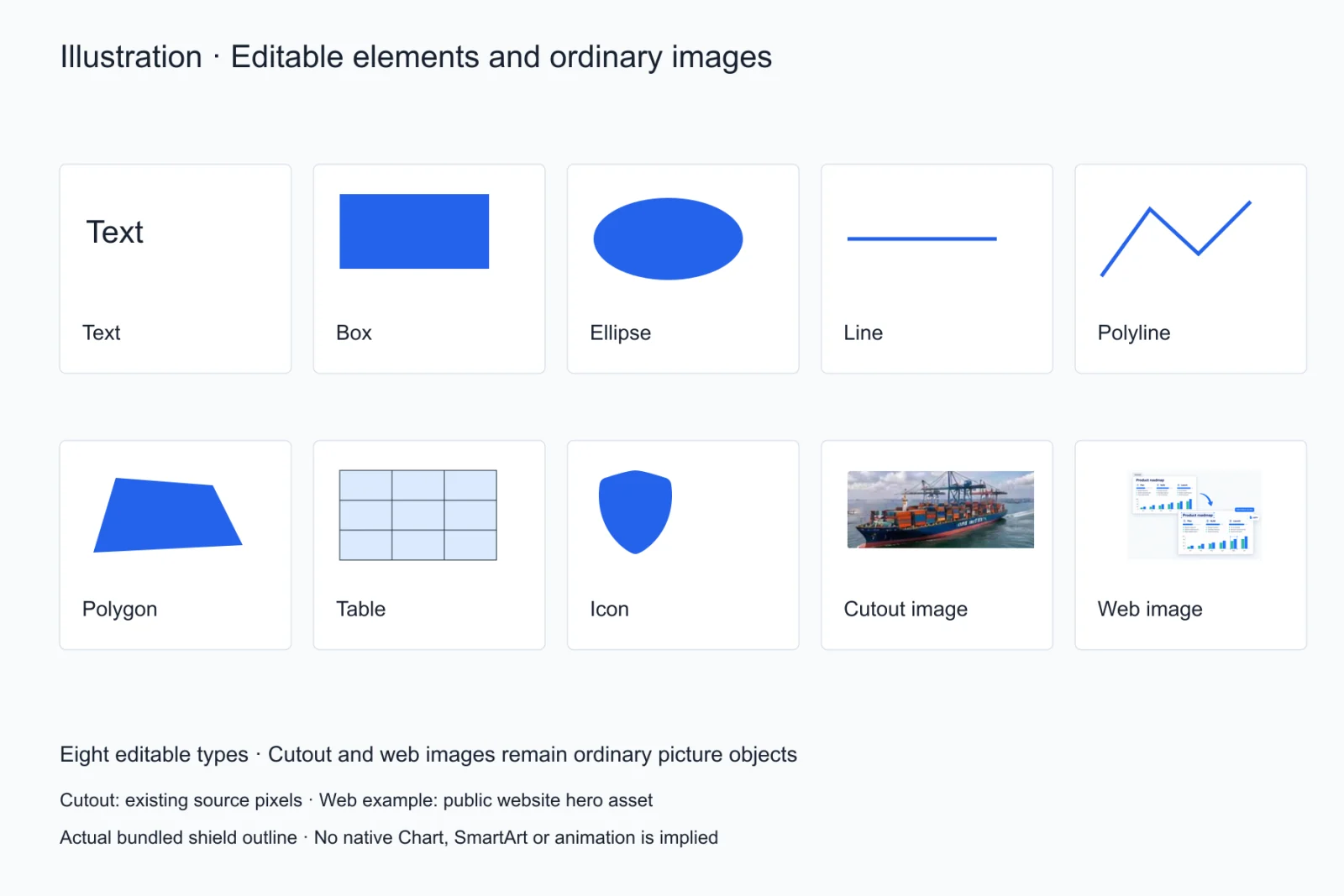
Here is what an image to editable PowerPoint export hands you: text becomes a text box you can type into, rectangles, rounded rectangles, ellipses and arrows become native shapes with editable points, tables become native tables with editable rows and cells, icons become vector shapes you can recolour, and photos are cropped out of the source as picture objects. Charts are the current exception: bars, axes and labels are separate objects you can restyle and relabel, but they are not yet native charts with an editable data series.

Architecture figures are the other frequent input, and convert diagram to editable PPT covers how their nodes and connectors come apart.

Text, shapes, tables, icons and pictures mapped to native objects
Element types in the export, not one flattened page

Key points

How to verify the export is really editable

Three checks settle whether the image to editable PowerPoint promise holds: click a heading and see whether a text cursor appears, open the Selection Pane and count objects — a page holding one Picture means the conversion failed, while a list of TextBox, Shape and Table entries means it worked — then double-click a table cell and type into it. Open the file once in Keynote or WPS as well, to confirm the objects stay selectable in another program.

That is the whole promise of converting an image to an editable PPT.

Which pages are not worth an editable PowerPoint pass

Full-page photography, illustration-led posters, gradient display type and blurry scans come back mostly as picture objects: they cannot be edited, and pretending otherwise helps nobody. Treat those pages as background art or rebuild the layout in a design tool.

The test is simple — if the page has no clear rectangles, text blocks or tables, there is little for an image to editable PowerPoint conversion to recover. Slide screenshots sit at the other end as the steadiest input, and screenshot to PPT breaks those cases down by source.

After the conversion, fonts and colours still need one pass

After an image to editable PowerPoint conversion, the original font name is not preserved: type is matched by visual characteristics to an available font, and gradients or stacked transparency degrade to a close colour. When brand rules are strict, replacing the theme font and the brand fills once in PowerPoint after export beats nudging elements one by one in the editor, and it is harder to miss a spot.

Who benefits from an editable PowerPoint file

Three people usually take over: a colleague who has to move the page into the corporate template, a team localising the copy, and an operator who changes a few numbers every quarter. None of them needs a designer to redraw the layout — they need a file where every element can be selected.

The image to editable PowerPoint export is a standard .pptx that opens in PowerPoint, Keynote and WPS with no add-in, and never sends you back to this site. What they hand over is usually a single image, and the image to PPT page splits that first step down by input format.

One page at a time beats converting the whole deck

Credits are charged per page in an image to editable PowerPoint workflow, so convert the three pages people actually cite first and confirm the heading levels, table dimensions and icons are acceptable before spending on the rest. If those three come back consistently conservative, the source resolution is the problem rather than the conversion: finding a sharper copy first is cheaper than stopping halfway.

When every slide in the file is one flat picture, convert image-based PPT to editable PPT starts one step earlier, at exporting the pages as images.

Pick the page that matches what you have

A JPG, a PNG, a screenshot or an AI-generated picture — one page per input, each with the converter at the top.

Image to slide overview

Subscribe to image to slide, no install

Image to slide runs entirely in the browser, and the exported file depends on no plugin.

See image to slide pricing
  • Native image to slide exportEvery image to slide export keeps text, tables and shapes as real objects, not one flat picture.
  • Shared image to slide creditsEach image to slide conversion and its completeness check cost credits per run; Pro chat edits are charged the same way.
  • Cancel anytimeCancel from the account page; image to slide exports you already made keep working.

Image to slide questions before uploading

How do I convert an image to an editable PPT?

That is what an image to editable PowerPoint pass does: upload the image, let the conversion finish and download the .pptx — text arrives as text boxes, blocks as shapes and tables as native tables. Recognition runs on the server, and the exported file opens in PowerPoint, Keynote and WPS with no add-in.

Will the export still contain one full-page picture?

Not for the inputs image to editable PowerPoint is built for. Slide screenshots, exported JPG/PNG decks and architecture figures come back with text, shapes, tables and icons as separate objects. If an export still holds a single picture, that is a bug — send us the source image.

Can I edit chart data in PowerPoint afterwards?

Not yet. A chart arrives as editable drawings — bars, axes and labels you can recolour or relabel — but the data series cannot be edited, and native chart objects are still in development.

Is the original font preserved?

No. A picture carries no font data, so image to editable PowerPoint matches the closest available face by appearance. Replacing the theme font after export is faster.

Which image formats are supported?

Image to editable PowerPoint accepts JPG, PNG, WebP and screen captures as they are, with no conversion step. What decides the result is pixel size and edge sharpness, not the extension.

Does image to editable PowerPoint need a connection?

The conversion needs a connection because recognition and decomposition run on the server; once the .pptx is downloaded, editing and saving it stay offline.

Updated November 2026